
In Part 1, the focus was on building a Context Document before trial: a single, structured briefing that gives your AI tool the background it needs to actually help you during the chaos of a live case. Think of that as laying the foundation by creating a baseline document to kick-off most of your prompts or projects throughout trial.
This post is about setting up document workflows you will rely on throughout trial. That is, pre-loaded, organized AI projects that let you retrieve key information, locate key exhibits, and analyze witness materials on demand.
The setup itself has nothing to do with clever prompting or sophisticated AI techniques; rather, it entails simple, almost boring preparation that mostly entails organization of documents into dedicated AI projects so that when you need something fast, you can get it in seconds.
If you have been through trial, you know how this plays out. Someone on the team says, "Didn't Dr. Ramos say something about the product testing timeline during her deposition?" Or the partner turns to you and says, "Find me a document that supports our position on the contract amendment." These moments come up constantly, and they almost always require answers as soon as possible.
AI is exceptionally well-suited for this kind of work, but only if the documents are already there, organized, and ready to query.
Strategy 1: Create a Transcript Project
One project to set up should be dedicated to trial transcripts. Every evening after a trial day, upload the day's transcript into a project in your AI tool of choice (this works in Harvey, Legora, ChatGPT Enterprise, or really any platform that supports document-based projects).
During trial, references to prior testimony come up all the time, but rarely with precision. A team member might recall the general substance of what a witness said, but not the specific language or the exact day it happened. Without AI, tracking down that testimony means flipping through transcript pages, scanning indices, relying on someone's handwritten notes from that day, or utilizing ctrl-f word search assuming you know the exact key-word or phrase to find.
With a transcript project, the process becomes a single prompt.
Here is what that looks like in practice. Say a colleague mentions that one of the opposing witnesses made a concession about the timeline of events, but cannot remember the details. You open your transcript project and type something like:
Find all instances across the uploaded transcripts in which there was testimony relating to the timeline of the product recall, including any references to when the defendant first became aware of the defect.
The AI will pull the relevant passages, citations to which transcript and page they appear on, and will provide you the exact language.
You can use the same project for broader analysis as the trial progresses:
Summarize all testimony given so far regarding the plaintiff's damages theory. Identify any inconsistencies between witnesses.
List every instance where a witness referenced Exhibit 47, including the context in which it was discussed.
Compare Dr. Ramos's trial testimony about the testing protocol with Mr. Chen's testimony on the same topic. Highlight any contradictions or areas of agreement.
The key insight here is that the value of this project grows with each passing trial day. By day three or four, you have a searchable repository of everything that has been said on the record. That is an incredibly powerful resource when preparing cross-examination, drafting motions, or just trying to recall what happened two days ago (which, during trial, can feel like two weeks ago).
A practical note on setup: Create this project before trial starts, even if there are no transcripts yet. Name it something obvious, like "Trial Transcripts - [Case Name]." As each day's transcript becomes available, upload it immediately. Make it part of the nightly routine.
Strategy 2: Review Tables for Witness-Level Analysis
If your firm uses Harvey or Legora, there is a feature that takes this entire approach to another level: Review Tables (Harvey) or Tabular Review (Legora). ChatGPT Enterprise's Projects feature supports similar document querying, though without the structured table format.

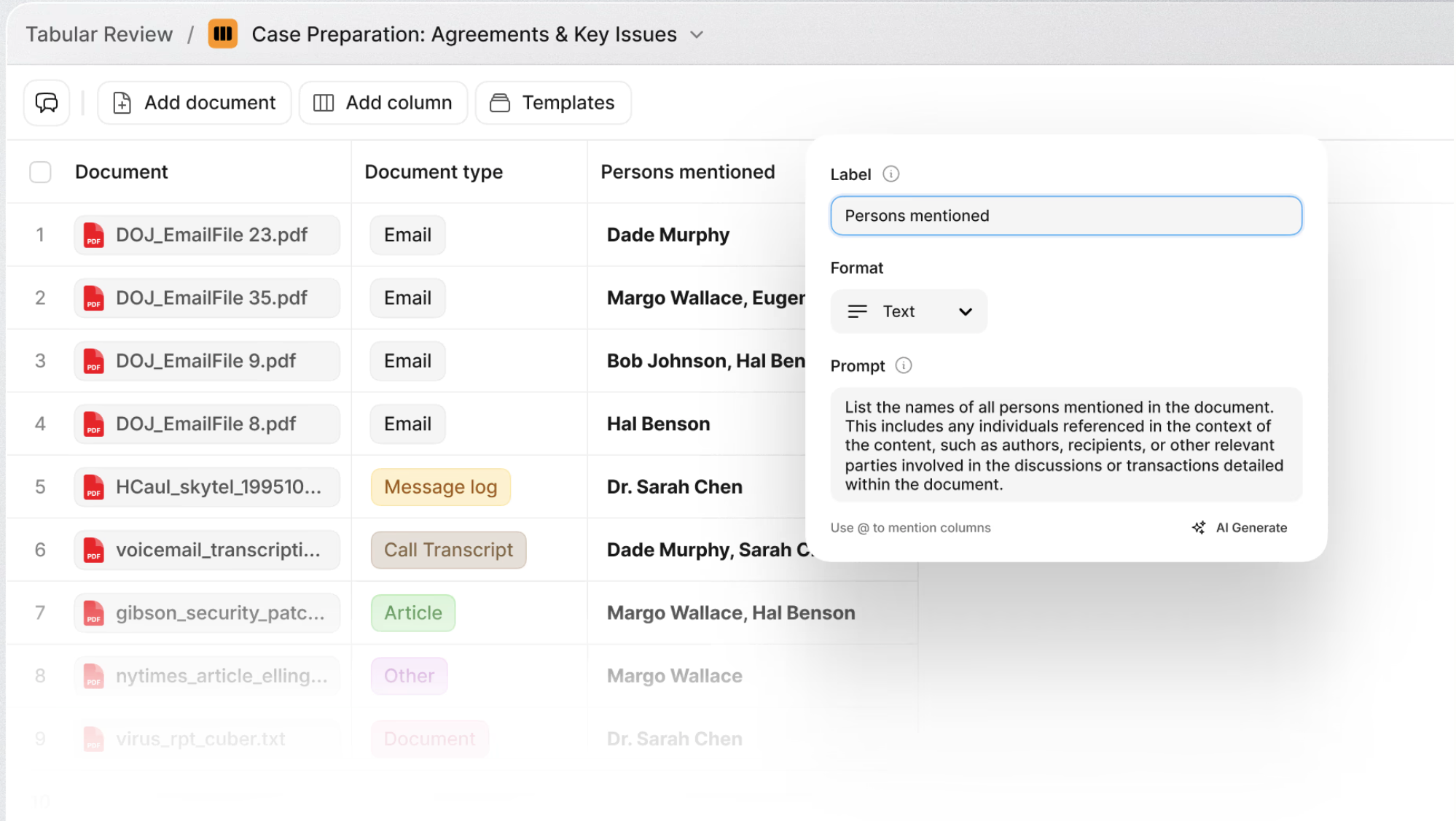
Here is the concept: rather than just uploading documents into a project and asking free-form questions, you can run structured, multi-column queries across your entire document set simultaneously. Think of it as building a spreadsheet where each row is a document and each column is a question or data point you want extracted. The AI processes every document against every query in parallel, and you get a structured table of results.
This is powerful in any context, but it one use case where it becomes especially valuable is during trial when organized around individual witnesses.
The Witness-Level Setup
For each key witness, consider creating a separate Review Table / Tabular Review project. Upload all of the documents relevant to that witness: their deposition transcript, any exhibits they are expected to testify about, business records they authored or received, prior declarations, expert reports they are referenced in, and so on.
Then define your columns. For a fact witness, the initial table might include columns like:
- Key admissions or concessions in the deposition transcript
- Topics where the witness appeared uncertain or evasive
- Documents the witness authored or was copied on
- Contradictions between the deposition testimony and documentary evidence
- Topics not yet addressed that should be covered at trial
The AI will process every uploaded document against each of these prompts and return a structured, row-by-row table of results. In minutes, you have a comprehensive witness profile built from the actual documentary record.
Why This Matters During Trial
Here is where this setup really pays off. As the trial progresses, things change. A witness who testified earlier says something unexpected. A new document gets admitted that was not in the original trial plan. Opposing counsel pursues a line of argument you did not fully anticipate. Your examination plan for an upcoming witness needs to adapt.
With a witness-level Review Table already in place, you can quickly add new documents (like a transcript from earlier that day) and run updated queries to see how the new information intersects with that witness's existing documentary record. You can add a new column asking the AI to identify connections between the morning's testimony and your upcoming witness's prior statements. You can sort and filter the results to zero in on what matters most given the trial's current trajectory.
In other words, you are not starting from scratch every time the trial takes a turn. You have a living, structured analytical tool for each witness that evolves as the trial does. The AI handles the brute-force document analysis, and you focus on the strategic decisions about what to do with the results.
An Example in Action
Imagine you are preparing for the cross-examination of the defendant's CFO, scheduled for tomorrow afternoon. You have a Review Table loaded with the CFO's deposition transcript, relevant financial records, board meeting minutes she attended, and her email correspondence from the relevant period.
This morning, the defendant's CEO testified and made several statements about the company's financial projections that seem inconsistent with what the CFO said at her deposition. You add today's CEO transcript to the CFO's Review Table project and run a new column:
Identify any statements in this transcript that are inconsistent with, or in tension with, the CFO's deposition testimony. For each, provide the specific page references from both transcripts.
A few minutes later, you have a structured comparison showing exactly where the CEO's testimony diverges from the CFO's prior statements, with specific citations you can use during cross-examination. That kind of analysis might have taken hours to compile manually.
Putting It All Together
Stepping back, here is why these document projects matter so much during trial.
Trial is fast. Decisions get made in hallways, in whispered conversations at counsel table, and during short breaks throughout the day. There is a real advantage if you can find the right document, the right quote, or the right inconsistency in minutes rather than hours.
The setup described here is not technically sophisticated, and it does not require complex prompting or deep expertise in AI tools. It's just a matter of discipline to load your documents into organized projects before and during trial so they are ready when you need them.
To summarize the playbook:
Transcript Project. Upload each day's transcript as it becomes available. Use it to search for testimony, track themes across witnesses, and identify inconsistencies in real time.
Witness-Level Review Tables. For each key witness, build a structured analytical project with their relevant documents and defined query columns. Update it as the trial progresses to keep your examination strategy aligned with how the case is actually unfolding.